



Ujam.com – Sound Like an Amazing Singer Even If You Are Not

We’ve heard our share of crappy singers, but now there is a solution with Ujam.com. An amazing piece of technology that will turn any sound to musical masterpieces.
Whistle a familiar tune or maybe just blare random sounds. Whatever it is, Ujam will find an appropriate accompaniment for it. This is some magic that should definitely be in karaoke machines.
Everything can be done on the website. So all you need is flash (yes that bloated software), and a microphone installed on your computer. With a mic and flash, you are good to go!
Video demonstration of Ujam below:
How to Download Singstar Songs from the UK Singstore
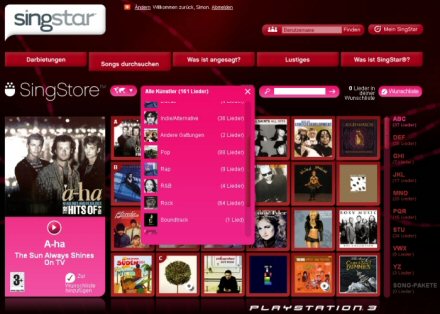
Universal Music Group had recently come to agreement to sell its songs on the UK/EU Singstore. But unfortunately, this will be unlikely extended to the US Sony American Singstore. So how can you download those Singstar songs from the EU/UK Singstore to use on your American PlayStation?
Materials required:
- Sony Playstation 3
- Singstar PS3
- UK PSN Card (Can be purchased from online retailers like HMV.com, Amazon.co.uk, etc.)
- UK Email account (.co.uk email) — using something like Yahoo! mail with home country set to United Kingdom
Directions:
- Create a new profile on your PS3. Be sure to have it as a UK PSN ID using the UK Email account.
- Load your Singstar PS3 CD. There will likely be a prompt to install a patch for the latest UK/EU version. Install the patch.
- When Singstar finally loads up, go to the online section and access the UK Singstore. Fill the cart with the songs you want (songs are ₤0.99 but do not need tax).
- To pay, select PSN card and enter the code of the UK PSN card you bought. You can download now!
- When the downloads are completed, sign out of the UK PSN ID profile and log into your regular PS3 profile.
- Start up Singstar again. It will now detect the new songs on the system and update your song library (like they had been purchased from the US Singstore).
Note: You will have to keep your UK PSN ID profile or you will lose all your downloads. This workaround is based on the fact that you can share content downloaded on a PS3 profile to all other profiles on the same PS3.
Windows Live Mail Desktop Gadget
I have always been wondering if there was some gadget application to read my Windows Live Mail on my desktop. There are many options like Mozilla Thunderbird and Microsoft Outlook. But the best one that is clean and easy to use (in my opinion) was the Windows Live Mail Desktop application.
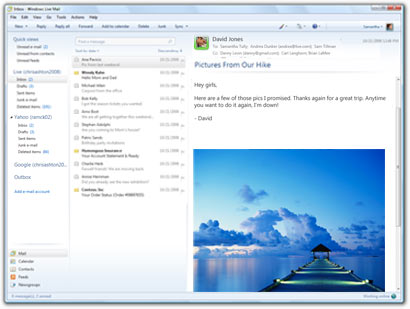
As you can see, it is a very clean and sleek program. It looks like a “lite” version of Microsoft Outlook and supports checking other e-mail account types like Gmail, and Yahoo! Mail.
You can download Windows Live Mail Desktop here (click here).
P.S. Windows Live Mail Desktop allows you to read the e-mails that you have synced offline.


